VgridPandas
VgridPandas - Integrates Vgrid DGGS with GeoPandas and Pandas, inspired by H3-Pandas.
VgridPandas supports a wide range of popular geodesic DGGS including H3, S2, A5, rHEALPix, Open-EAGGR ISEA4T, EASE-DGGS, DGGAL, DGGRID, QTM, as well as graticule-based DGGS such as OLC, Geohash, MGRS, GEOREF, TileCode, Quadkey, Maidenhead, and GARS.








Full VgridPandas DGGS documentation is available at vgridpandas document
To work with Vgrid in Python or CLI, use vgrid package. Full Vgrid DGGS documentation is available at vgrid document
To work with Vgrid DGGS in QGIS, install the Vgrid Plugin.
To visualize DGGS in Maplibre GL JS, try the vgrid-maplibre library.
For an interactive demo, visit the Vgrid Homepage.
Installation
pip

| pip install vgridpandas --upgrade
|
Key Features
- Latlong to DGGS: Convert latitude and longitude coordinates into DGGS cell IDs.
- DGGS to geo boundary: Convert DGGS cell IDs into their corresponding geographic boundaries.
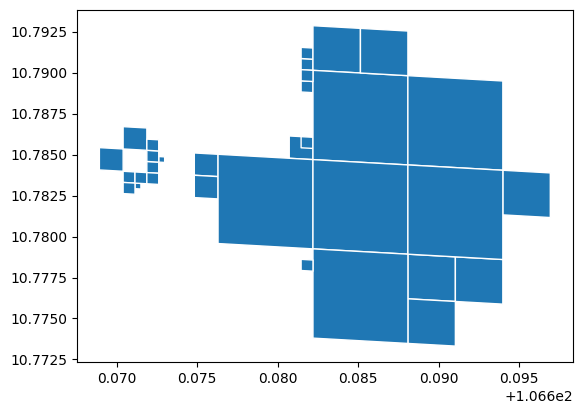
- (Multi)Linestring/ (Multi)Polygon to DGGS: Convert (Multi)Linestring/ (Multi)Polygon to DGGS, supporting compact option.
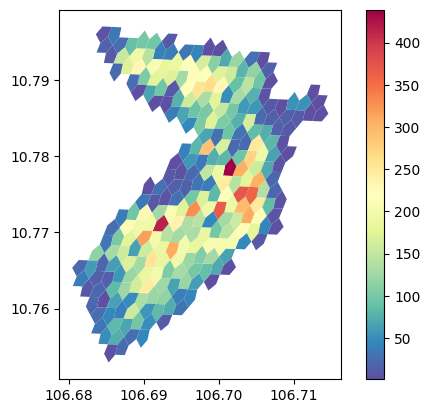
- DGGS binning: Aggregate points into DGGS cells, supporting common statistics (count, min, max, etc.) and category-based groups.
Usage examples
Latlong to DGGS
| import pandas as pd
from vgridpandas import h3pandas
df = pd.DataFrame({'lat': [10, 11], 'lon': [106, 107]})
resolution = 10
df = df.h3.latlon2h3(resolution)
df
| h3 | lat | lon |
|-----------------|-------|-------|
| 8a65a212199ffff | 10 | 106 |
| 8a65b0b68237fff | 11 | 107 |
|
DGGS to geo boundary
| df = df.h3.h32geo()
df
| h3 | lat | lon | geometry |
|-----------------|-------|-------|-----------------|
| 8a65a212199ffff | 10 | 106 | POLYGON ((...)) |
| 8a65b0b68237fff | 11 | 107 | POLYGON ((...)) |
|
(Multi)Linestring/ (Multi)Polygon to DGGS
| import geopandas as gpd
from vgridpandas import s2pandas
gdf = gpd.read_file('https://raw.githubusercontent.com/opengeoshub/vopendata/refs/heads/main/shape/polygon.geojson')
resolution = 18
gdf_polyfill = gdf.s2.polyfill(resolution, compact = True, predicate = "largest_overlap", explode = True)
gdf_polyfill.head()
gdf_polyfill = gdf_polyfill.s2.s22geo("s2")
gdf_polyfill.plot(edgecolor = "white")
|
DGGS Binning
 1
 2
 3
 4
 5
 6
 7
 8
 9
10
11
12
13
14
15
16
17 | import pandas as pd
import geopandas as gpd
from vgridpandas import a5pandas
resolution = 15
df = pd.read_csv("https://raw.githubusercontent.com/opengeoshub/vopendata/refs/heads/main/csv/dist1_pois.csv")
# df = gpd.read_file("https://raw.githubusercontent.com/opengeoshub/vopendata/refs/heads/main/shape/dist1_pois.geojson")
stats = "count"
df_bin = df.a5.a5bin(resolution=resolution, stats = stats,
# numeric_column="confidence",
# category_column="category",
return_geometry=True)
df_bin.plot(
column=stats, # numeric column to base the colors on
cmap='Spectral_r', # color scheme (matplotlib colormap)
legend=True,
linewidth=0.2 # boundary width (optional)
)
|
Further examples
For more examples, see the
example notebooks.